
Posted At: Jun 25, 2026 - 2,374 Views

When sourcing smart glasses for your business, understanding the fundamental connectivity features separates successful product launches from frustrating customer support tickets. Bluetooth pairing represents the cornerstone of how users interact with their smart eyewear, making it essential knowledge for every B2B buyer, distributor, and brand manager in this space.
Smart glasses have evolved from novelty gadgets into sophisticated wearable devices that consumers expect to work seamlessly with their smartphones. Whether you're stocking Smart Bluetooth Audio Glasses for retail or sourcing custom designs for your brand, the pairing process remains remarkably consistent across manufacturers while varying in execution quality.
Why Bluetooth Connectivity Matters for Smart Glasses
Bluetooth technology serves as the vital bridge between smart eyewear and the smartphone ecosystem. Without stable Bluetooth connectivity, features like hands-free calling, music streaming, voice assistant integration, and notification delivery simply cannot function. For businesses, this means understanding the underlying technology helps you evaluate supplier claims and communicate effectively with your Bluetooth glasses for driving customers when issues arise.
The latest Bluetooth 5.0 and 5.2 specifications deliver improved range, faster pairing, and more stable connections compared to older versions. When evaluating OEM partners, ask about the Bluetooth chipsets they utilize—quality components from established manufacturers like Qualcomm, MediaTek, or Realtek typically deliver superior performance over budget alternatives.
Power consumption also varies significantly between Bluetooth implementations. Premium chipsets offer better battery management, extending use time between charges—a selling point that matters enormously to end consumers and directly impacts return rates and reviews.
Step-by-Step Bluetooth Pairing Process
The following pairing methodology applies broadly across smart glasses manufacturers, though specific steps may vary slightly depending on the device and smartphone operating system. We recommend documenting the exact process for each product line you carry to provide accurate customer support.
Preparing Your Smart Glasses for Pairing
Before initiating the pairing process, ensure your smart glasses have adequate battery charge—typically a minimum of 20% prevents unexpected shutdowns during the pairing sequence. Power on the glasses using their designated button, usually located on the temple arm or bridge.
Most smart glasses enter pairing mode automatically on first use or after a factory reset. The indicator light will flash blue or alternate between colors, signaling discoverability. If your glasses don't enter pairing mode automatically, consult the user manual for the specific activation method—usually holding the power button for 5-10 seconds.
Position the glasses within one meter of your smartphone to ensure strong signal strength during the initial pairing handshake. Avoid pairing near other active Bluetooth devices or in areas with significant wireless interference.
Discovering and Connecting on iOS Devices
For iPhone users, navigate to Settings > Bluetooth and ensure the toggle is switched to the on position. The system will automatically scan for nearby Bluetooth devices. Your smart glasses should appear in the "Other Devices" section with their designated name.
Tap the device name to initiate the connection request. Some glasses may require a confirmation code—enter "0000" or "1234" if prompted, though most modern devices pair automatically without this step. The status will change to "Connected" once the handshake completes successfully.
iOS devices typically remember paired devices, automatically reconnecting when the glasses power on within range. This convenience factor significantly impacts user satisfaction and should be highlighted in your product marketing materials.
Discovering and Connecting on Android Devices
Android pairing processes vary slightly between manufacturers due to customized interfaces, but the core steps remain consistent. Open Settings > Connections > Bluetooth (or Settings > Bluetooth on simpler interfaces) and enable Bluetooth scanning.
The smart glasses will appear in the "Available devices" list. Select the device to begin pairing. Android 10 and later versions include enhanced pairing prompts that simplify the process significantly, displaying a notification that streamlines the connection without navigating through multiple screens.
After successful pairing, verify the connection by checking for the Bluetooth icon in your notification bar and confirming audio routing to the glasses in your media settings. Android devices sometimes require manual audio output selection, so guide customers to check their sound settings if audio doesn't route automatically.
Common Bluetooth Pairing Challenges and Solutions
Even premium smart glasses occasionally encounter connectivity issues. Understanding common problems helps you provide better support to your customers and evaluate supplier quality.
Device Not Appearing in Bluetooth List
If the smart glasses don't appear during scanning, verify they remain in pairing mode with the indicator light actively flashing. Power cycling the glasses often resolves recognition issues—turn them off completely, wait ten seconds, then power back on.
Some smartphones accumulate cached Bluetooth data that interferes with new device recognition. Clearing this cache or restarting the phone frequently resolves persistent discovery problems. Provide customers with these troubleshooting steps when they contact support.
Distance represents another common factor. Ensure the glasses and phone are within three feet of each other during initial pairing attempts. Electronic interference from Wi-Fi routers, microwave ovens, or other Bluetooth devices can also disrupt discovery.
Intermittent Connection Drops
Connection instability typically stems from one of three causes: low battery, excessive distance, or Bluetooth profile mismatches. Verify the glasses maintain adequate charge and stay within the specified range—usually 30-50 feet for most smart eyewear.
Profile issues arise when devices negotiate incompatible audio codecs or connection protocols. Modern smart glasses support A2DP for audio streaming and HFP/HSP for calls. If only one function works, a firmware update from the manufacturer may resolve codec negotiation problems.
Audio Quality Issues After Pairing
Tinny sound, audio lag during video playback, or one-sided audio indicate quality problems worth addressing. Distance from the phone, physical obstructions, and Bluetooth version incompatibilities all impact audio fidelity.
For businesses, these quality issues directly affect customer satisfaction and return rates. When sourcing products, prioritize manufacturers using Bluetooth 5.0 or higher and high-quality audio codecs. The difference in user experience justifies the typically marginal cost increase.
Optimizing Smart Glasses for Business Use
Beyond basic pairing, B2B buyers should understand how smart glasses integrate into broader use cases and customer expectations.
Multi-Device Connectivity
Many modern smart glasses support simultaneous pairing with multiple devices—a valuable feature for users who switch between phone, tablet, and laptop throughout the day. Understanding this capability helps you position products effectively for different customer segments.
Professional users appreciate the ability to remain connected to their work laptop while receiving call notifications from their personal phone. Lifestyle customers value the convenience of seamless switching between streaming devices. Position multi-device support as a premium feature when appropriate for your market segment.
Firmware Updates and App Integration
Quality smart glasses manufacturers provide companion apps that enable firmware updates, customizable controls, and enhanced functionality. These apps also handle Bluetooth optimization, often improving connection stability through software refinements.
When evaluating OEM partners, inquire about their app development roadmap and update frequency. Products that receive regular firmware improvements demonstrate manufacturer commitment to customer satisfaction and long-term brand value—critical factors for businesses building sustainable product lines.
Sourcing Considerations for B2B Buyers
Understanding Bluetooth pairing technology directly informs your supplier evaluation process. Look for manufacturers who can explain their Bluetooth implementation in technical detail rather than simply quoting version numbers.
Quality Indicators in Bluetooth Implementation
Superior smart glasses typically feature dedicated Bluetooth antennas rather than share antennas with other wireless functions. They specify particular chipsets rather than generically claiming "Bluetooth enabled." They provide clear documentation about supported profiles and codecs.
Request sample units for thorough testing before committing to large orders. Evaluate the pairing process yourself, time how long it takes, note any quirks or difficulties, and assess the resulting connection stability. Your firsthand experience provides more valuable information than supplier specifications.
Certification and Compliance
All Bluetooth-enabled products sold internationally require proper certification, including FCC marking for US sales and CE marking for European markets. Verify your supplier provides complete documentation and that their Bluetooth implementations meet regulatory requirements for your target markets.
Unauthorized or improperly certified Bluetooth devices face customs delays, market removal, and potential legal liability. Reputable manufacturers handle certification as standard practice—be suspicious of suppliers who treat compliance as optional or negotiable.
Product Spotlight: Bluetooth Glasses for Driving
One of the fastest-growing smart glasses categories combines eyewear protection with Bluetooth calling capabilities. Bluetooth glasses designed for driving represent an excellent entry point for businesses entering this market.
These devices typically feature noise-canceling microphones, dedicated call controls, and polarized or photochromic lenses that adapt to changing light conditions. The Bluetooth implementation prioritizes call clarity and safety—users keep their hands on the wheel and eyes on the road.
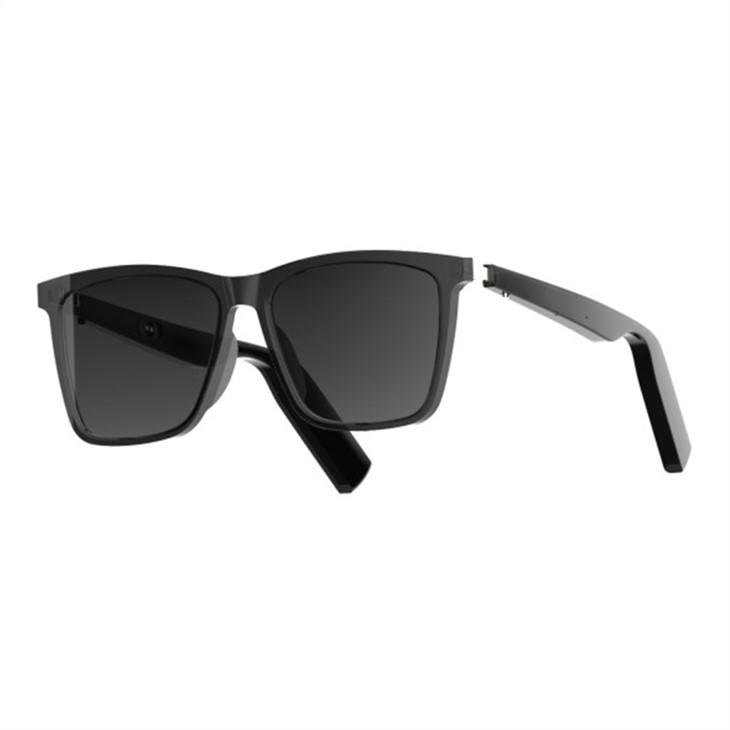
When sourcing driving glasses, pay particular attention to microphone quality and wind noise reduction. These factors differentiate premium products from budget alternatives and significantly impact user satisfaction and repeat purchase behavior.
Supporting Your Customers Post-Purchase
Providing clear, accessible pairing instructions with every product reduces support burden and improves customer satisfaction scores. Consider creating video tutorials demonstrating the pairing process for each product line you carry.
Develop a FAQ document addressing common pairing questions, including device-specific troubleshooting for the most popular smartphone models in your market. Proactive support materials demonstrate professionalism and reduce inbound support requests.
Collect customer feedback about pairing experiences and use this information when evaluating future suppliers or negotiating with existing partners. Persistent pairing complaints often indicate quality issues that impact your entire product line.
Future-Proofing Your Smart Glasses Business
Bluetooth technology continues evolving, with Bluetooth LE Audio promising significant improvements in audio quality, battery life, and broadcast capabilities. Forward-thinking businesses should monitor these developments and select suppliers positioned to adapt to emerging standards.
The next generation of smart glasses will leverage Bluetooth 5.3 and beyond, incorporating features like Auracast broadcast audio and enhanced power efficiency. Partnering with manufacturers actively investing in R&D ensures your product catalog remains competitive as the market evolves.
Understanding the fundamentals of Bluetooth pairing today positions your business to evaluate emerging technologies intelligently. The principles remain consistent even as specifications improve—reliable connectivity, intuitive pairing, and stable performance form the foundation of user satisfaction.
Making Informed Purchasing Decisions
Armed with this knowledge about Bluetooth pairing technology, you're better equipped to evaluate suppliers, assess product quality, and communicate effectively with your customers. Every smart glasses purchase decision should consider not just the features and price, but the underlying technology that makes those features possible.
Request samples from multiple manufacturers, compare the pairing experience side-by-side, and document your findings. The difference between a smooth, intuitive pairing process and a frustrating one becomes immediately apparent when experienced firsthand.
Quality smart glasses enhance daily life through seamless connectivity—they become invisible tools that simply work whenever needed. Achieving this standard requires attention to fundamental technologies like Bluetooth pairing throughout your sourcing and quality control processes.
Partner with Smart Glasses Factory
Ready to source smart glasses that deliver exceptional Bluetooth performance? Smart Glasses Factory specializes in OEM and ODM manufacturing for businesses worldwide. Our engineering team understands Bluetooth technology deeply and implements quality solutions across our product range.
Contact our sales team to discuss your requirements, request samples, or explore customization options for your brand. We provide comprehensive technical documentation, firmware support, and responsive service that helps your business succeed in the competitive smart eyewear market.
Whether you're launching your first smart glasses product or expanding an established line, understanding pairing fundamentals ensures you make informed decisions that benefit your customers and your bottom line. The connection between smart glasses and smartphone represents more than technology—it represents the moment your product becomes part of someone's daily routine.
